Loop's widgets, and how Kaizenly's differ
Loop actually ships more widget types than Kaizenly does. They're built on a different idea, though — and which idea you want decides the answer.
What Loop gives you
Six widget types, plus a stack widget that cycles through several habits in one slot:
| Widget | Shows |
|---|---|
| Checkmark | One habit, tap to tick today off |
| History | One habit's calendar of past days |
| Score | One habit's strength over time |
| Frequency | One habit, by day of week |
| Streak | One habit's longest runs |
| Target | One habit's progress toward a number |
The pattern is in the right-hand column: every Loop widget is about one habit. Six habits you want on the home screen means six widgets, or the stack widget and a swipe to see the rest.
What Kaizenly does with four
| Widget | Shows | Closest Loop widget |
|---|---|---|
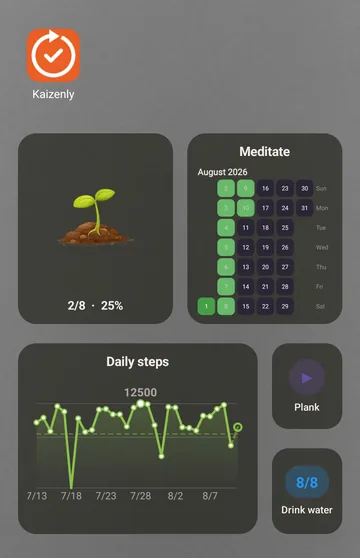
| Progress plant | All of today at once — a plant that grows as you finish habits | No equivalent |
| Single habit | One habit: tick it, or start its stopwatch, in one tap | Checkmark / Target |
| Habit heatmap | A year of consistency in one grid | History |
| Trend | Where progress is heading | Score |
The two real differences
One widget for the whole day
The Progress plant is the one with no counterpart in Loop. Instead of one habit per widget, it takes today as a whole and turns it into a single thing you read without counting: a seedling in the morning, a full plant by the evening. If your home screen is currently four Loop checkmark widgets in a row, this replaces the row.
A stopwatch on the widget
Loop tracks habits you tick and habits you measure. It has no timer, so it has no timer widget. In Kaizenly, meditation, reading and exercise can run a stopwatch on the habit card, and the Single habit widget can start it without opening the app.
Where Loop is ahead: if you want a per-habit widget for day-of-week frequency or a dedicated streak widget, Loop has those and Kaizenly doesn't. Kaizenly shows the same information, but inside the app on the Statistics and habit detail screens rather than on the home screen.
Which to pick
- You want each habit charted separately on the home screen — Loop does this well, and it's free and open source. There's no reason to switch.
- You want today's whole picture in one glance, or a timer you can start from the home screen — that's what Kaizenly's set is built around.
If you do try Kaizenly, you don't start from an empty app: it reads Loop's own backup file and brings every habit and every day of history across. Here's how →
Kaizenly is not affiliated with, endorsed by, or derived from Loop Habit Tracker. Loop is an independent open-source project by Álinson S. Xavier. Loop's widget list above was read from its public source code.