Loop Habit Tracker sync and backup
Loop keeps everything in one local database on one phone. That is a deliberate privacy decision, not a missing feature — but it does mean a lost phone is a lost history.
Why Loop has no cloud sync
Loop's own store listing is explicit about it: the app "doesn't require an Internet connection or online account registration" and "your confidential data is never sent to anyone." There is no server, so there is nothing to sync to. Everything lives in a SQLite database inside the app's private storage.
For a lot of people that is exactly the right trade. The cost only shows up on the day the phone is stolen, wiped, or replaced — and at that point there is no account to sign back into.
How to back Loop up today
Loop can hand you your data, it just won't store it for you. Two exports, and they are not interchangeable:
| Export | What it contains | Use it for |
|---|---|---|
Export full backup.db |
The whole database — every habit, every check-in, schedules, targets | Restoring Loop, or moving to another app |
| Export as CSV | Readable tables of your check-ins | Spreadsheets and analysis |
Do this on a schedule you'll actually keep. A backup you made once, eight months ago, restores the habits you had eight months ago. Whatever you choose, put a repeating reminder on it — the export is manual and nothing in Loop will nag you.
What Kaizenly does instead
Kaizenly is also offline-first — no account, and it works with the network off. The difference is that backup is automatic and optional: connect Google Drive once, choose daily or weekly, and it writes a backup on its own. Restoring shows you the list of backups to pick from.
The Drive permission is the narrow one. Kaizenly asks for the app-data scope
(drive.appdata) — a private, hidden folder inside your own Drive. It cannot see your
documents or photos, and no other app can see its folder. Disconnect whenever you like; the
backups already written stay in your Drive.
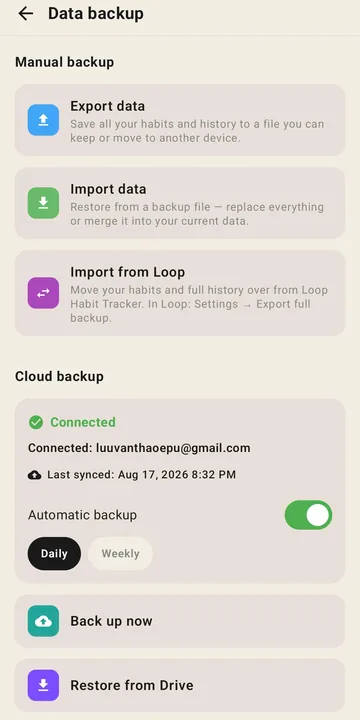
Being precise, because this is where habit apps oversell. This is scheduled backup and restore — not live two-device sync. Tick a habit on your phone and it does not appear on a tablet a second later. If real-time multi-device sync is what you're after, neither Loop nor Kaizenly is the app for you, and you'll want one with an account and a server behind it.
Side by side
| Loop Habit Tracker | Kaizenly | |
|---|---|---|
| Works offline | Yes | Yes |
| Account required | No | No |
| Backup | Manual export, stored by you | Manual, or automatic daily/weekly |
| Cloud destination | None | Your own Google Drive, app-private folder |
| Restore | Re-import the file you kept | Pick from the list of backups |
| Live multi-device sync | No | No |
Moving over without losing anything
The same .db file you'd use to restore Loop is the file Kaizenly imports. Every
habit and every day of history comes across, and the import tells you afterwards what to
double-check.